Inventory Spreadsheet vs Inventory Software: When a Small Business Should Switch
The question usually arrives at a bad moment. Something went wrong — an oversell, a stockout, an hour lost reconciling two files that disagreed — and the immediate conclusion is that the spreadsheet has failed and it is time to pay for proper software.
Sometimes that is right. Often the spreadsheet did not fail; it was being asked to do a job it structurally cannot do, and no amount of better formulas would have helped. Knowing which of the two you are in is worth about a thousand dollars a year.
Full walkthrough of the template used in this guide.
Here is the honest comparison, and the arithmetic to decide with.
What Each One Is Actually Good At
Spreadsheet
Inventory software
Cost
One-off, or free
Monthly, per user, usually forever
Setup time
An afternoon
Days to weeks, plus data migration
Reorder points and alerts
Yes — and you control the formula
Yes, often automated
Valuation at cost and retail
Yes
Yes
Turnover, dead stock, category reports
Yes, with formulas you can see
Yes, prebuilt
Purchase orders
Yes, as a tracker
Yes, often sent to the supplier directly
Several people editing at once
Poor — conflicts and overwrites
Built for it
Barcode scanning
No
Yes
Live multi-channel sync
No
Yes
Audit trail of who changed what
No
Yes
Thousands of SKUs
Technically yes, practically painful
Yes
Customisable to an odd business
Completely
Only where the vendor allows
Works if you stop paying
Yes, forever
No
Read the bold rows. Those four capabilities are the entire case for software, and they are genuine — a spreadsheet cannot be made to do any of them, no matter how well built. Everything above them, a decent spreadsheet does, and does with one advantage that gets undersold: you can see the arithmetic. When software says a line needs reordering, you take its word for it. When your own sheet says it, you can open the cell and check whether the lead time behind it is still true.Small Business Inventory Tracker spreadsheet - what's inside
The Five Thresholds
Volume is the wrong test. Capability is the right one. Cross any of these five and a spreadsheet stops being a tool and starts being a liability.
1. More than one person edits stock at the same time. This is the most common breaking point and it arrives earlier than people expect. Two people in one file, or worse two copies of a file, produces silent overwrites — not error messages, just quietly wrong numbers that nobody can trace. Cloud spreadsheets soften this but do not solve it, because concurrent edits to the same row still resolve badly and nothing records who did what.
2. You need barcode scanning. If stock moves fast enough that typing SKUs is the bottleneck, or if picking errors are costing you real money, scanning is not a nice-to-have. A spreadsheet cannot scan, and a workaround built on a phone app writing to a sheet is a project you will end up maintaining forever.
3. You sell the same stock in more than one place, live. An online shop, a marketplace and a physical till all drawing from one pool of units is the classic oversell scenario. A spreadsheet updated at end of day will let two channels sell the same last unit at 2pm. If you have already refunded an angry customer for this, the threshold is behind you.
4. SKU count in the thousands. Not because the file cannot hold the rows, but because a spreadsheet is something you read. Past a few hundred products, nobody is eyeballing the reorder column, and maintenance effort rises faster than the catalogue does.
5. Somebody other than you needs to answer for the numbers. Staff, a bookkeeper, an investor, an auditor. The moment “who changed this and when” is a question that must have an answer, you need an audit trail, and a spreadsheet does not have one.Small Business Inventory Tracker spreadsheet - feature detail
If none of the five describes you — one location, a few hundred SKUs, you and maybe one other person, one main sales channel — the spreadsheet is not the problem, and switching will cost you money and a fortnight to solve something else.
The Break-Even Arithmetic
If a threshold has been crossed, the next question is what the subscription has to be worth. Do it in hours, because time is what you are actually buying.
Take a plan at $99 a month — a placeholder; use whatever you have actually been quoted, and check whether it is per user, because that changes the sum:
$99 × 12 = $1,188 a year
At a $25-an-hour value on your own time: 1,188 ÷ 25 = 47.5 hours a year
That is roughly an hour a week the software has to save before it breaks even on time alone.Small Business Inventory Tracker spreadsheet - feature detail
Now be honest about both sides of that.
On the software’s side, in addition to time saved: the oversells it prevents (count how many you actually had last year and what each cost you in refunds, fees and goodwill), the stockouts avoided by automated reordering, and the hours not spent reconciling files that disagree.
On the spreadsheet’s side, and usually forgotten: the setup and migration time you will spend, which is rarely under a week of real effort; the learning curve for anyone else who touches it; the ongoing cost that never stops; and the fact that a lot of software still requires the same discipline — someone has to receive stock, log adjustments and count shelves, and no subscription does that for you.
The failure mode to watch for: buying software to fix a discipline problem. If stock movements are not being logged in the spreadsheet, they will not be logged in the software either, and you will have paid $1,188 a year for a more expensive set of wrong numbers.
The Middle Path Most Small Shops Actually Want
There is a third option that gets skipped, and for a lot of businesses it is the right one: use both, for different jobs.
Let your sales channel handle the live quantity — most e-commerce platforms already decrement stock on a sale, and that is the one job a spreadsheet genuinely cannot do. Then run the spreadsheet for the thinking: landed cost per unit, margin per line, reorder points built on your own measured lead times, valuation at cost and retail, turnover by category, dead stock, purchase order planning.
Those are analysis jobs, not transaction jobs. They happen weekly or monthly, not per-sale, and they are exactly what a spreadsheet is good at — while being the reports that entry-level inventory software is often weakest on, because it is built to move units, not to answer “which category is my cash stuck in”.
Many shops run this arrangement for years without ever needing a dedicated inventory system.
Before You Switch: Three Things to Do First
If you are close to the line, these are worth doing regardless. Two of them often remove the reason to switch, and all three make the migration better if you go ahead.
1. Fix the reorder points. A large share of “the spreadsheet keeps letting us run out” is not the spreadsheet — it is round-number reorder points that were never calculated. The reorder point formula, worked on real numbers takes ten seconds per SKU and fixes the actual complaint in most cases.
2. Clean the data. Duplicate SKUs, products entered twice under different names, unit costs that exclude shipping, quantities that have not been counted in a year. Migrating this into software gives you the same mess at $99 a month, and you will spend the first month of your subscription cleaning it anyway. Do it now, in the file you already have.
3. Do a full physical count. Whatever system you end up in, its opening quantities have to be true. A migration that imports wrong numbers produces a system nobody trusts, quickly — and once staff start keeping their own side-notes because the system is wrong, the recovery is worse than the original problem.
The Thing Worth Remembering
Spreadsheets do not fail because a business got bigger. They fail at four specific capabilities — concurrent editing, scanning, live multi-channel sync and an audit trail — and they fail at those on day one, at any size.
If you have crossed one of those lines, no amount of formula work will save it and you should switch. If you have not, the honest answer is that a well-built sheet with correct reorder points, landed unit costs and a movement log will run a single-location small business for years, cost you nothing per month, and let you see exactly why it says what it says.
Fix the reorder points first. Count the shelf. Then decide — the full inventory spreadsheet setup is here, and it will tell you fairly quickly whether the file is the problem or the inputs are.
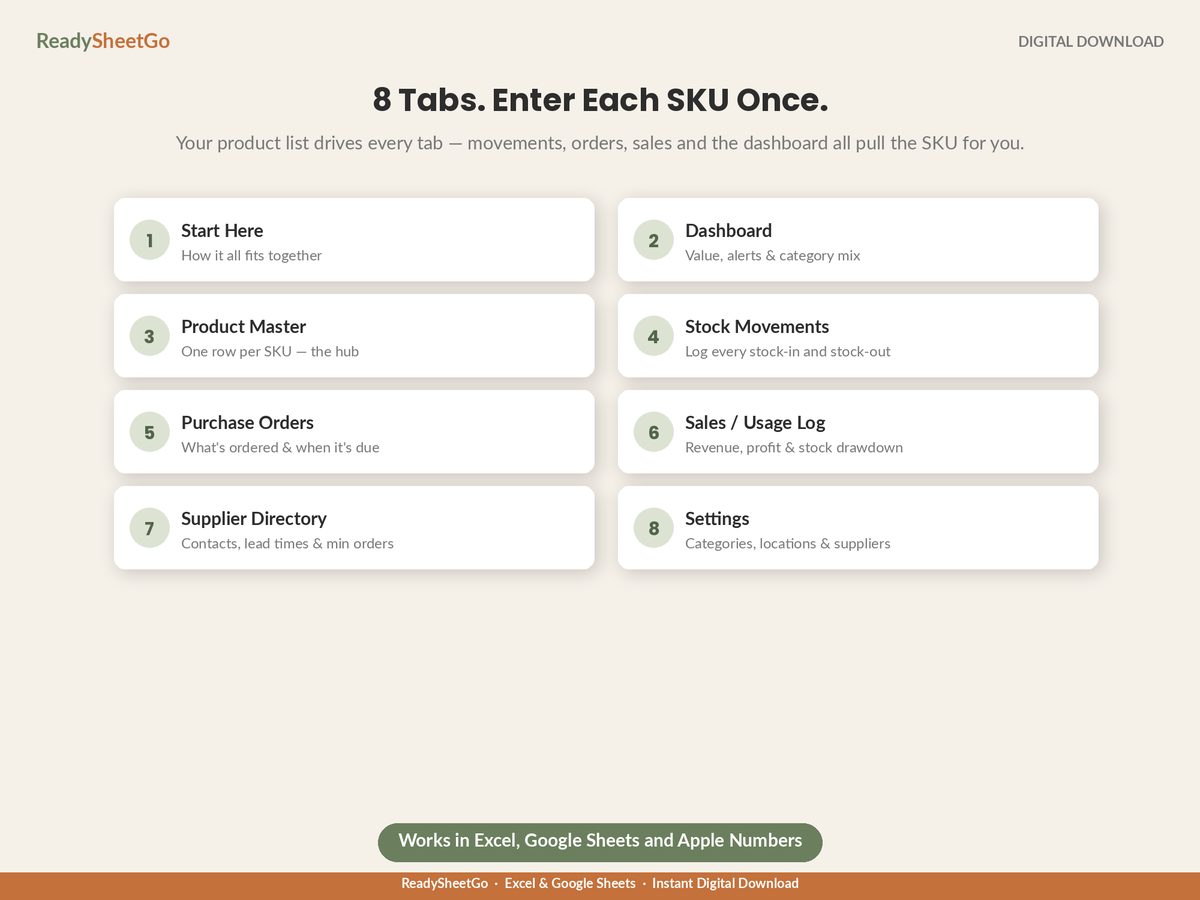
One file, once, instead of a subscription that never stops. Eight ready-built tabs with every formula already written and tested, and 24 sample products pre-filled.
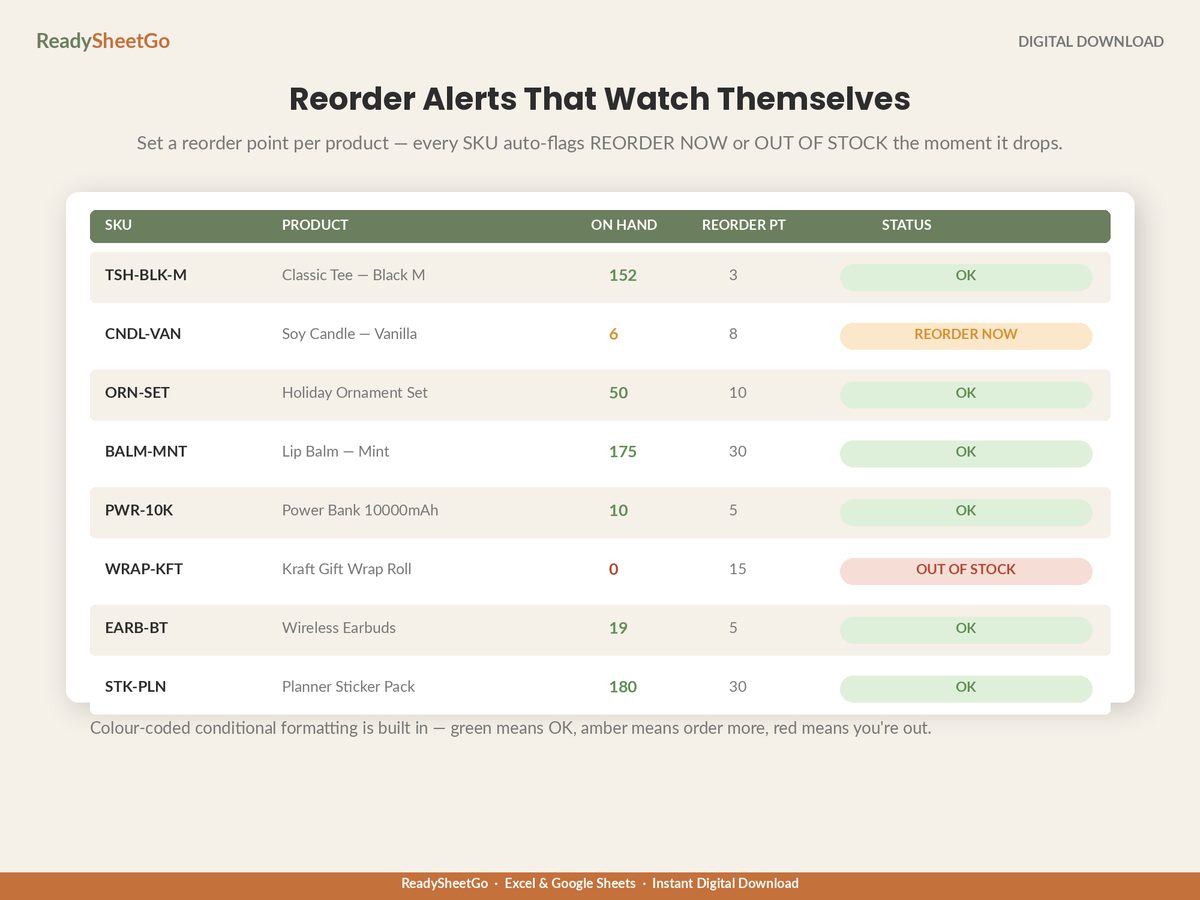
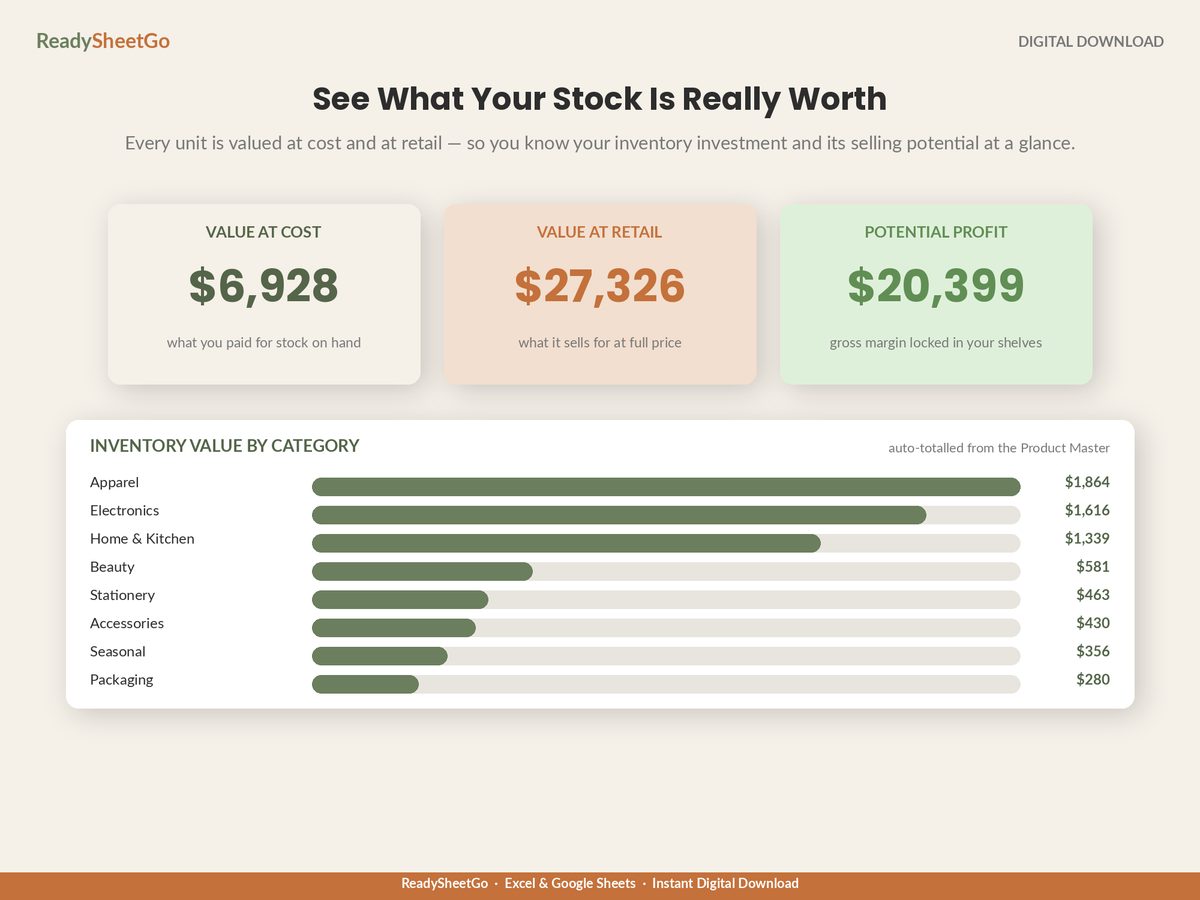
The Product Master holds one row per SKU and returns margin, on-hand quantity, value at cost, value at retail and a live status against a reorder point you set per product — OK, REORDER NOW in amber, OUT OF STOCK in red. Stock Movements logs every stock-in and stock-out with multi-location support and recalculates on-hand instantly. Purchase Orders track what is ordered, what each line costs, when it is due and whether it arrived. The Sales / Usage Log returns revenue and gross profit per line. The Supplier Directory holds contacts, lead times and minimum order quantities. The Dashboard returns total value at cost and retail, potential profit, alert counts, open purchase orders, a dead-stock flag and inventory value by category.
Nothing is password-locked and nothing is hidden — every formula is visible and editable, which is the one thing a subscription will not give you. Works in Excel, Google Sheets and Apple Numbers. No macros, no add-ons, no account to create.
Is a spreadsheet good enough for small business inventory?
For one location, up to a few hundred SKUs and one or two people touching stock, yes — and it does one thing software often does badly, which is let you see and change the arithmetic. Spreadsheets stop being adequate at specific thresholds rather than at a size: several people editing simultaneously, barcode scanning at the point of sale, live syncing across multiple sales channels, or thousands of SKUs. Those are capability limits, not volume limits.
How many SKUs can a spreadsheet handle?
Technically tens of thousands of rows; practically, the limit is how many products a person can eyeball and maintain by hand. Somewhere in the high hundreds, a spreadsheet stops being something you read and becomes something you query, and the maintenance effort rises faster than the SKU count. A few hundred SKUs on one site is comfortable. Two thousand across three locations is not, regardless of what the file can technically hold.
What can inventory software do that a spreadsheet cannot?
Four things, essentially: multi-user editing without version conflicts, barcode scanning tied to stock movements, live syncing between sales channels so two places cannot sell the same unit, and an audit trail of who changed what. Everything else — reorder points, valuation at cost and retail, turnover, dead-stock flags, purchase orders — a well-built spreadsheet does perfectly well, and often more transparently, because you can see every formula.
How do I know if inventory software would pay for itself?
Convert the subscription into hours. A $99-a-month plan is $1,188 a year; at a $25-an-hour value on your own time, it has to save about 47.5 hours a year, or roughly an hour a week, before it breaks even on time alone. Then add what it prevents: if overselling across channels costs you real orders, or stockouts cost real margin, that goes on the other side of the scale. Run your own numbers rather than accepting either side's marketing.
Know What You Have, What It's Worth and What to Reorder
The Small Business Inventory & Stock Management Tracker — 8 ready-built tabs with every formula already written — a Settings tab holding your categories, storage locations and suppliers, which feed the dropdowns on every other tab; a Product Master with one row per SKU that is the hub of the whole file, returning margin, on-hand quantity, value at cost, value at retail and a live stock status against the reorder point you set per product, so every line flags itself OK, REORDER NOW in amber or OUT OF STOCK in red the moment it drops; a Stock Movements log where every stock-in and stock-out recalculates on-hand instantly, with multi-location support built in; a Purchase Order tracker holding what was ordered, what it cost by line, when it is due and whether it has been received; a Sales / Usage Log that returns revenue and gross profit per line and draws the stock down automatically; a Supplier Directory with contacts, lead times and minimum order quantities — the numbers a reorder point is built from; a dead-stock flag that surfaces products sitting on the shelf that have never moved; and a Dashboard returning total inventory value at cost AND at retail side by side, the potential gross profit sitting on your shelves, units on hand, low-stock and out-of-stock counts, open purchase orders and inventory value broken out by category. 24 sample products pre-filled — type over them or clear them. Plain-English Start Here guide. Works in Excel, Google Sheets and Apple Numbers, no macros and no add-ons.